Yesterday, November 20, 2026, I was sitting in the audience at performance.now() in Amsterdam. On stage was Max Inden, talking about how HTTP/3 and QUIC 0-RTT can shave multiple round-trips off network connections and speed up page loads. At one point during his talk, he challenged the audience: open savearoundtrip.com and check how your own site holds up.
I entered this blog's URL and got a brutal verdict: Netlify — where I had been hosting the site until yesterday — supported neither QUIC nor HTTP/3. To get them, the most direct route was migrating to Cloudflare (who also happened to be a conference sponsor).
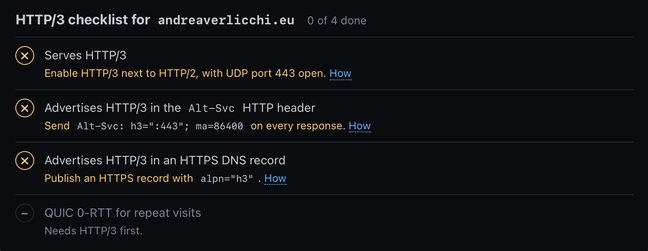
There was also an extra incentive: some Mozilla swag up for grabs for anyone who could show the speaker, after the talk, that their site passed all 5 checks run by savearoundtrip.com. So I thought: "Sure, I'll knock this out on the fly between talks!" Spoiler: the migration succeeded, though it wasn't exactly instant, so I missed out on the swag — but what I experienced during that hour-long migration genuinely blew my mind and is well worth sharing.
Beyond code: when AI takes control of the browser #
That Gemini, Claude, or any other AI model could adapt this blog's codebase — built with Eleventy — to move from Netlify to Cloudflare was something I fully expected: rewriting config files, redirects, or small serverless functions is their bread and butter.
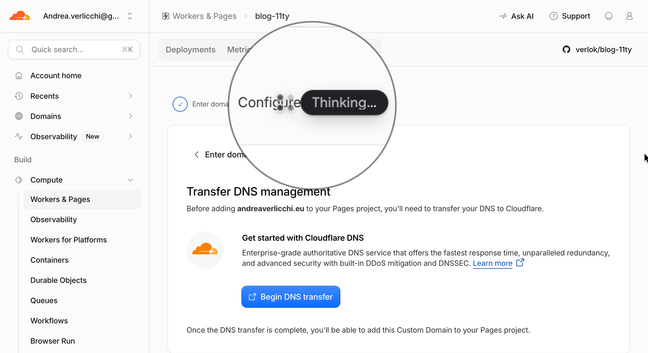
What truly surprised me, and what I want to focus on in the first part of this story, was watching Antigravity and Gemini 4 Neon directly drive the built-in web browser, clicking and filling out forms on my behalf while I watched and kept tabs on what they were doing (with one eye on my screen and the other on the conference).
I got there almost out of exasperation. At first, I was following the usual script: I had the Cloudflare dashboard open and was asking the AI how to proceed. The problem was that Gemini kept directing me to a hidden menu item that was nearly impossible to find in Cloudflare's maze of menus. I was about to fall into that classic frustrating loop we all know:
- "Go to section X and click Y."
- "It's not there, I can't find it."
- "Sorry, let me check the docs... ah okay, they moved that menu, try under Z."
This was also because I had stumbled onto outdated documentation on migrating to Cloudflare Pages, whereas Cloudflare is deprecating Pages in favor of Workers. I'll get to that.
At that point I changed approach: instead of acting as a "mechanical arm" following the AI's text instructions, I asked Antigravity to drive the browser directly and deal with the unexpected UI itself. From that moment on, everything changed.
Under my direct supervision, the agent:
- Explored the Cloudflare dashboard until it found the right section on its own, without me having to hunt through nested submenus.
- Interacted with the UI controls: clicking buttons, filling in text fields, setting up the project, managing DNS records, and configuring redirect rules.
- Operated inside my domain registrar's dashboard to point my domain's nameservers to Cloudflare instead of Netlify.
- Even handled a full second migration — from Cloudflare Pages to Cloudflare Workers — the moment I realized I had just migrated the site onto a product Cloudflare is gradually deprecating (and which, ironically, turned out to be the very thing blocking 0-RTT!).
A funny detail: GoDaddy in Dutch #
Since I was in Amsterdam, there was one more comic hurdle: as soon as I opened my registrar's site to change the nameservers, the entire interface loaded in Dutch. I spent a couple of minutes looking for the language switcher to switch it back to English or Italian, and just couldn't find it. Then I asked myself: do I really need to change the language if the AI model is multilingual?
Sure enough, the different language didn't faze it one bit: the agent navigated through GoDaddy's Dutch settings — effortlessly clicking options like Naamservers and confirming forms in the local language. Go, Dutch Daddy!
Why it was mind-blowing #
By delegating browser operations to the AI, I managed to save time, getting the migration done between talks while keeping an eye on what was happening on screen.
Up until now, I had only had AI drive browsers for testing or analyzing web pages, never to actually get something done on my behalf. I found it super useful because I don't migrate domains, deal with DNS records, swap nameservers, or navigate cloud dashboards — which redesign their UI every six months anyway — very often.
Watching an agent operate in the browser on my behalf in just a few minutes, under my supervision, adds another piece to the puzzle of tasks AI can help you complete.
Video of the migration #
I recorded my screen during several parts of the process to show Antigravity live as it moves the cursor, navigates the dashboards, and completes the setup. Here is the video below.
The final result: 5 of 5 #
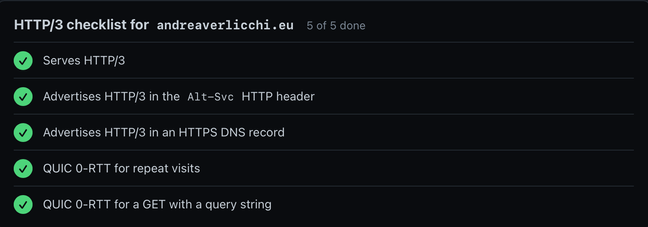
In the end, the migration succeeded completely: this blog is now running on Cloudflare Workers, and re-running the check on savearoundtrip.com finally lit up all 5 green checkmarks — for both HTTP/3 and QUIC 0-RTT.
Behind the scenes: everything we did, step by step #
For anyone curious about the technical details of the whole operation, here is the full walkthrough of everything Gemini 4 Neon and Antigravity handled across code, dashboards, DNS, and debugging until we hit that coveted 5 out of 5 on savearoundtrip.com.
1. Adapting the blog codebase from Netlify to Cloudflare Pages #
The first step was freeing this blog's repository (built on Eleventy v3) from Netlify-specific configuration. The agent replaced netlify.toml by moving all legacy static redirects into public/_redirects, which Eleventy copies straight into the _site output folder, making sure to order static rules ahead of wildcard rules as Cloudflare requires.
There was one slightly trickier piece of logic: on the site root, I had an automatic redirect based on the browser's Accept-Language header to send visitors to /it/ or /en/ according to their preferred language. On Netlify a declarative rule was enough, while on Cloudflare Pages it required a small bit of custom code: the agent wrote a Cloudflare Pages Function (functions/index.js) capable of properly parsing Accept-Language quality weights (q=...) and returning a 302 with the right headers (Vary: Accept-Language and Cache-Control: private, no-store).
Before deploying, we also cleaned up the domain's SEO consistency: we updated _data/metadata.js and content/index.html to point everywhere to https://www.andreaverlicchi.eu/ (matching the apex-to-www redirect), merged the branch into main, ran a full build of all 295 site files, and verified that canonical, hreflang, og:url, and sitemap.xml had no lingering bare-apex references.
2. Cloudflare and GoDaddy dashboards on autopilot #
Once the code was ready on GitHub, Antigravity opened the browser and took charge of the entire infrastructure side.
First, it created the blog-11ty project on Cloudflare Pages, connecting it to the GitHub repository with the build command npm run build, output directory _site, and Node 20 (read from .nvmrc), confirming the first deployment succeeded.
Right after that, it moved on to Cloudflare DNS: it added the andreaverlicchi.eu zone on the free plan and cleaned up the four legacy Netlify A records that Cloudflare's automatic scanner had imported from the previous setup.
Then came the registrar — the infamous GoDaddy in Dutch. The agent went into the Naamservers section, replaced the old Netlify/NS1 nameservers with the ones assigned by Cloudflare, and waited until the zone became active in Full DNS Setup mode. Finally, back on Cloudflare, it attached both andreaverlicchi.eu and www.andreaverlicchi.eu as custom domains on the project and enabled the 301 redirect rule from root to www, preserving any query strings.
3. The 0-RTT mystery (and detective-level debugging) #
With the blog now served by Cloudflare, I rushed straight to savearoundtrip.com ready to celebrate. Instead: 3 of 5. HTTP/3 was working smoothly, yet the QUIC 0-RTT for repeat visits check came back red (0-RTT enabled: no). That very snag is what cost me the Mozilla swag!
This is where Gemini 4 Neon amazed me a second time, showing off impressive investigative skills:
- Checking via API: it queried Cloudflare's API directly to check the actual zone state, confirming that
http3,0rtt,tls_1_3(with zero round-trip),ech, andalways_use_httpswere all enabled — while also taking the chance to set the minimum TLS version to TLS 1.2, a solid balance between modern security and compatibility. - Reading the test tool's source code: instead of guessing, the agent went to GitHub to read the Go source code of
savearoundtrip.com's checker (mxinden-bot/savearoundtrip) to see exactly what it verifies. It discovered that the tool opens a QUIC v1 connection, sends aHEAD /request, waits for a TLS 1.3NewSessionTicket, and checks whether theEarlyDataflag is enabled. - Isolating the cause: we ran the test on both my domains and the internal
.pages.devhostname — all three failed 0-RTT. Comparing them withsavearoundtrip.comitself, which ran on the exact same free-tier Cloudflare IPs yet scored a clean 5 of 5, made the picture crystal clear: Cloudflare Pages Custom Domains route through an internalpages.devlayer that didn't advertise QUIC 0-RTT on the Free plan.
And right while digging into this behavior, I realized that Cloudflare Pages is the product Cloudflare itself is gradually leaving behind in favor of Cloudflare Workers (with Static Assets).
4. Pivoting to Cloudflare Workers and an instant 5 of 5 #
At that point the choice was obvious: leave Pages behind and migrate everything to Cloudflare Workers with Static Assets, tying the domain directly to the zone's TLS/0-RTT configuration.
On the code side, the pivot was fast and super clean. The agent created wrangler.jsonc pointing to ./_site as the static assets directory, configured 404 page and trailing-slash handling, and added a clever optimization: run_worker_first: ["/"]. This way the JavaScript Worker (src/worker.js, where we moved the Accept-Language redirect logic) is invoked only on the homepage, while all other HTML pages, images, and _redirects rules are served directly from the edge without consuming Worker invocations.
After a local syntax check and Eleventy build, we pushed to main and put Antigravity back in the driver's seat in the browser:
- it created the new
andreaverlicchi-blogWorker connected to GitHub (npm run build+npx wrangler deploy) and watched the first build succeed on the first try with all 295 static files uploaded to the edge; - it detached
andreaverlicchi.euandwww.andreaverlicchi.eufrom the old Pages project (letting Cloudflare automatically remove the oldCNAMErecords pointing topages.dev); - it attached both domains as Custom Domains on the new Worker, generating the corresponding Cloudflare-managed DNS records.
Right after the swap, another run on savearoundtrip.com — and this time we got an instant 5 of 5:
- Serves HTTP/3: confirmed.
- Advertises HTTP/3 in
Alt-Svc: confirmed (h3=":443"; ma=86400). - Advertises HTTP/3 in the HTTPS DNS record: confirmed (
alpn: h3 h2, withechconfigured). - QUIC 0-RTT for repeat visits: confirmed (
0-RTT enabled: yes). - QUIC 0-RTT for a
GETwith a query string: confirmed.
As a final touch, we verified live that all redirects worked (both apex-to-www with language selection, and legacy paths like /about/ to /en/about/), removed the now-obsolete functions/index.js from the repo, and permanently deleted the old Pages project from the Cloudflare dashboard.
Wrapping up #
In the end I didn't win the Mozilla swag, that's true. Still, I'm heading back from Amsterdam with a faster blog — finally on HTTP/3 and QUIC 0-RTT — hosted on a modern Cloudflare Workers architecture, and above all with the realization that the way we interact with web services can change even before the Web Model Context Protocol (Web MCP) becomes mainstream.
An AI agent no longer just tells you where to click: it opens the browser, navigates a dashboard in Dutch, and gets the job done right in front of your eyes — this is the next level.